Configure Identifiers
Identifier Types
An Identifier is a defined data point used to detect and track relevant external threats across monitored sources.
To support diverse monitoring needs, Flare offers a flexible set of Identifier types, including Domain, Identity, Keyword, BIN, IP Address, and Custom Identifiers. Each type serves a specific investigative purpose, helping you build a precise and proactive defense posture.
Domain
Domain Identifiers are used to search for activities related to a domain name. When the system searches for a domain name on the criminal underground or the clear web, it looks for a precise match aligned with the following rules:
With a domain like foo.com:
- foo.com, bar.foo.com, or foo.com.au is a match
- foo2.com, or foo.comment is not a match
With a subdomain like foo.bar.com:
- foo.bar.com, abc.foo.bar.com, foo.bar.com.au is a match
- foo.bar.comment, foofoo.bar.com, foo.bar.au.com, bar.com, or com is not a match
Note: Identifiers are NOT case sensitive. This is true for across all source types.
We will identify whether domains are reachable or resolvable with these icons:

In Flare, reachable is a subset of resolvable.
- A resolvable domain means the DNS successfully translates it to an IP address.
- A reachable domain means our system can establish a connection with that IP.
A domain may be resolvable but not reachable for several reasons, including:
- The IP is no longer in service.
- The IP requires authentication (e.g., private/internal IPs).
- The connection attempt times out.
There may be other causes, but these are the most common. If you encounter a domain that is resolvable but not reachable, we recommend further investigation. If you believe a domain should be reachable but isn’t, please report it as a potential bug so our team can troubleshoot.
You are also able to filter domains by their DNS record and host status, and apply these filters by date.

Subdomain Identifiers are important for certain cases:
- Auto-enumerating subdomain identifiers provides more comprehensive visibility across your attack surface.
- Look-alike domain detection; individual subdomain identifiers are required.
- For stealer logs; when a subdomain is the authorization URL or in the email, we wouldn't match it without the specific subdomain identifier.
- For leaked credentials; any email addresses associated with subdomains wouldn't be found without the specific subdomain identifier.
- For the majority of our Dark Web sources; chatter involving a subdomain will be missed without the specific subdomains identifiers.
Domain Authorization
Domain authorization is required to access certain categories of information, including domain-specific credentials and personally identifiable information (PII) linked to Events within a domain.
Organizations can request authorization for their primary domain by submitting an authorization request. Once granted, the standard Domain Identifier can reveal PII linked to Events within that domain.
Click through the following demo to learn how to submit a domain authorization request.
Bulk Authorization
To request authorization for multiple Domain Identifiers, select the Identifiers and then click the Request Authorization option from the context menu.
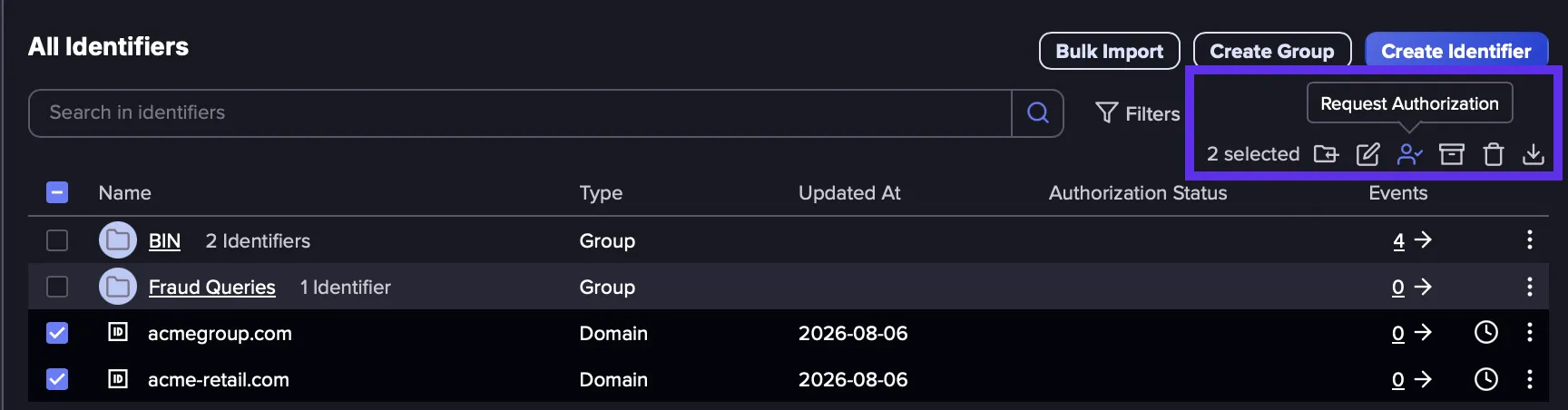
- Bulk authorization supports up to 10 Domain Identifiers at a time. To authorize more than 10, please submit the requests in separate batches.
- If Domain Identifiers are organized into a Group, selecting the Group does not authorize the Identifiers within it. Select the individual Domain Identifiers inside the group, then request authorization from the context menu.
Identity Identifiers
Identity Identifiers are used to search for people-related activities, specifically with their first and last names. You can add Email, Name (First Name/Last Name) and Username as attributes in the same identity identifier.
Name Attributes have an optional setting called Strict mode. When enabled, Flare will only search for activities that contain subsequent first name and last name. This can help reduce false positives for people with common first names.

For example, you are likely to find leaked passwords results or discussions of a person or business alongside their email address, name or username on the open web. We will show the leaked passwords associated with the specific attributes, search for mention of this email on clear web and dark web, and track any commits made to source code repository websites.
There are two ways to create an Identity Identifier:
- Manually create an Identity Identifier (Unauthorized)
- Sync your identities from Entra ID (Authorized)
Keyword
Keyword Identifiers are used to search for activities related to specific keywords. For example, you can search for your organization's name or brand names and monitor for mentions of those keywords on the dark web.
Flare also uses Keyword Identifiers to do data collection. Keyword Identifiers will be used to search on different platforms Flare monitors (like GitHub, Twitter, Shodan, etc.). Any results that are found will then be added to Flare so that you can view them in your Event Feeds.
Azure Tenant
Azure Tenant Identifiers are used to search for events containing mentions of an Azure Tenant. This type of Identifier functions similarly to the Keyword type. The main difference between the two is that Identifier Recommendations will recommend Azure Tenant type Identifiers when a monitored domain is found to be linked to a Microsoft Azure Tenant.
Monitoring for an Azure Tenant ID is a great way to detect secrets on GitHub (or other sources) when there is no reference to the domain of your organization due to configuration files containing Azure Tenant ID's.
BIN
BIN Identifiers are used to search for activities related to credit card numbers, starting with the specified bank identification numbers. Enter the first numbers of the card without spaces. Flare handles any spaces that might appear in the crawled content and keeps only the card numbers that match the Luhn algorithm.
For example, with BIN 52588:
- 5258 8199 1008 5316: Match
- 5258819910085316: Match
- 5 2 5 8 8 1 9 9 1 0 0 8 5 3 1 6: Match
- 52 588 1991 0085316: Match
A regex can also be used. For example, with BIN 52588[0-1]:
- 5258 8199 1008 5316: Match
- 5258 8299 1008 5315: No match
IP Address
IP Address Identifiers are used to search for activities related to IP addresses. This is particularly useful for monitoring open ports or to look for technical information leaks related to addresses in your public IP range. Both specific IP addresses and CIDR IP ranges are supported. For example: 172.1.1.35, 172.1.1.0/24.
Query
Query Identifiers are used to filter Events by field or through regex patterns to search for terms that do not fit any other Identifier type. Search queries are written using Lucene query syntax.
To find Events indexed before the Identifier was created, the query or regex can be pasted into Flare's search bar to search historical data. See Search in Existing DataSearch in existing data for syntax details and examples.
Important to note:
- Queries used in a Query Identifier can have 1000 words separated by boolean operators and a nested structure of 20 levels deep maximum.
- Query Identifiers do not match Events in real time. They check for new Events once every 24 hours, so a new matched Event may take up to a day to appear in your feed. If real time detection is needed, use Matching Policies for IdentifiersMatching Policy with other Identifier Types, since those generate matched Events as soon as new Events come in.
Github Repository
GitHub Repository Identifiers allow you to specify both a Repository Owner and Repository Name on GitHub and then monitor for new activities that match the information provided.
Password
Password Identifiers allow you to monitor the clear and dark web for mentions of a password you know. This can be helpful for locating mentions of a previously leaked password to better understand how potential threat actors might discuss it on the web.
Threat Categories
A Threat Category is a predefined set of the individual categories most relevant to a particular type of threat. Selecting a Threat Category pre-selects its recommended categories as a starting point, which you can then customize.
These selections are recommendations rather than restrictions. You can select any combination of individual categoriess and remove any that are not required before saving. You can also select multiple Threat Categories, search for an individual category/data source, or click Unselect all to clear the current selection.
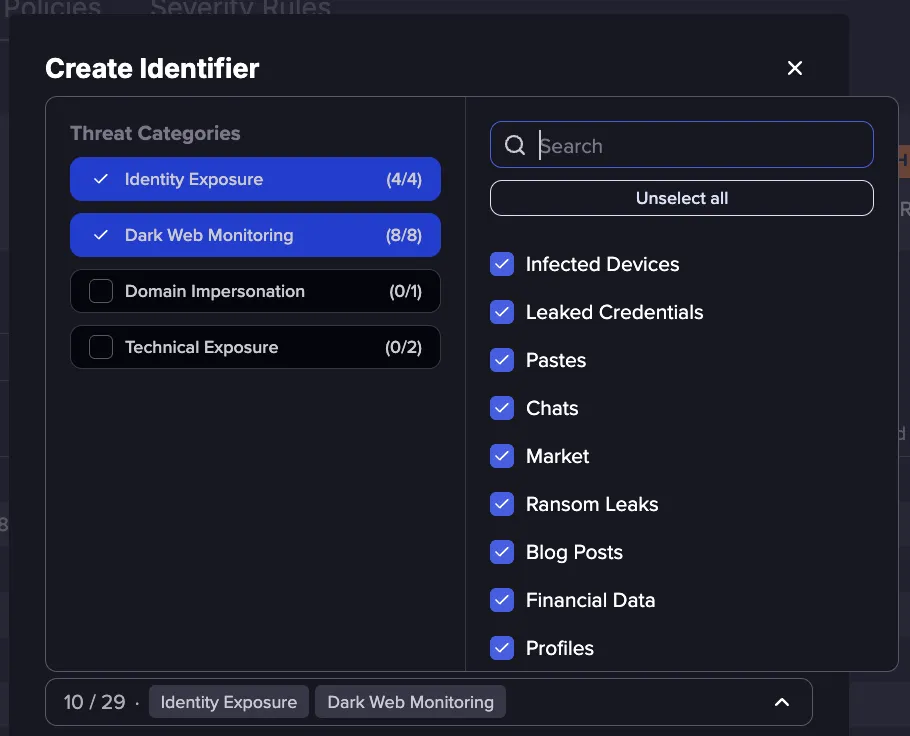
The complete set of Threat Categories and the individual categories each one pre-selects is shown below. Not all Threat Categories appear for every Identifier type.
Threat Category | Individual Categories |
|---|---|
Identity Exposure | Infected Devices, Leaked Credentials, Pastes, Chats |
Dark Web Monitoring | Pastes, Chats, Market, Ransom Leaks, Blog Posts, Financial Data, Profiles |
Domain Impersonation | Lookalike Domain |
Technical Exposure | Buckets, Source Code |
By default, some individual categories are unavailable for certain Identifier types to avoid returning zero results or false positives. The categories available per Identifier type are as follows:
Identifier Type | Available Categories |
|---|---|
Domain | All Illicit Networks, Pastes, Source Code, Google, Hosts, Buckets, Leaked Credentials, Lookalike Domains |
Keyword | All Illicit Networks, Pastes, Source Code, Google, Hosts, Buckets |
Identity | All Illicit Networks, Pastes, Source Code, Google, Leaked Credentials |
Azure Tenant | All Illicit Networks, Source Code, Google, Hosts, Buckets |
Query | All Illicit Networks, Pastes |
BIN | All Illicit Networks, Pastes, Google |
IP Address | All Illicit Networks, Pastes, Source Code, Google, Hosts |
Password | Leaked Credentials |
GitHub Repository | Source Code |
For all Identifier types, Emerging Sources are disabled by default but can be manually enabled if needed.
Severity
Select the minimal alert severity to ignore less critical events associated with this identifier.
To learn more about severities, see Understand Severity Scoring.
Matching Policies
Matching Policies are a per-Identifier filtering system that gives you precise control over which events appear in an Identifier's feed. With Matching Policies, you can include or exclude events based on keywords, or refine results using a full Lucene search query.
More details are available on the Matching Policies for IdentifiersMatching Policies for Identifiers page.
Add to group
You can add this identifier to an existing identifiers group.
To create a group, Go to the ‘Identifiers’ tab -> click on ‘Create Group’ -> give it a name, add it to an existing group if necessary -> click on “Create Group” when you’re done.
Alerts
You now have the ability to create alerts directly from a specific identifier within the Identifiers section. All configured alerts can be viewed in Alert Central, where the targeted identifier is displayed in the Identifier Scope column.
