Roles & Permissions
This document describes what each team member role can and cannot do within the Flare platform to ensure clarity for operational workflows and onboarding.
Organization-Level Roles
Flare uses organization-level roles to manage access and responsibilities across your entire account
- Organization Admin: This role has full administrative control across all tenants in your organization. Org Admins can create and manage tenants, assign tenant-level admin and other roles, configure tenant & organization-wide integrations (including SSO), and oversee user management at the organization level.
- Regular Member: This role allows users to participate within tenants of the organization, with access and actions determined by the specific tenant-level roles (Tenant Admin, Tenant Editor, Tenant Viewer) assigned to users within each tenant. You can have more information in the Tenant-Level Roles Section below.
| Org Admin | Regular Members |
|---|---|---|
Create & Manage Tenants | ✅ | ❌ |
Assign Tenant Admin(s) | ✅ | ❌ |
Manage Integrations | ✅ | ✅ (Only Tenant Admins) |
Tenant-Level Roles
Flare uses tenant-level roles to control what users can do within each tenant under a specific organization.
These roles determine access for Regular Members to features, data, and actions within a specific tenant. Tenant-level roles ensure your team members have the right level of access based on their responsibilities, while maintaining security and operational clarity across your Flare environment.
✅ Can Edit - 🔍 Read-Only Access - ❌ No Access
| Tenant Admin | Tenant Editor | Tenant Viewer |
|---|---|---|---|
Manage Users within Tenant | ✅ | ❌ | ❌ |
Manage Email Alert Channels | ✅ | ✅ | ❌ |
Manage Identifier(s) | ✅ | ✅ | 🔍 |
Manage Report(s) | ✅ | ✅ | 🔍 |
Remediate/Ignore Event(s) & Credential(s) | ✅ | ✅ | ✅ |
View Passwords for Credentials | 🔍 | 🔍 | 🔍 |
Validate Credentials (EntraID) | ✅ | ✅ | 🔍 |
Use Global Search (scoped by tenant) | ✅ | ✅ | ✅ |
Use Threat Flow | ✅ | ✅ | ✅ |
API Access (Create API Keys) | ✅ | ✅ | ✅ |
Takedown Requests | ✅ | ✅ | ❌ |
When adding a member to a new tenant, you’ll now see an overview of the key permissions they can access. For the complete list of available permissions, refer to the table above.
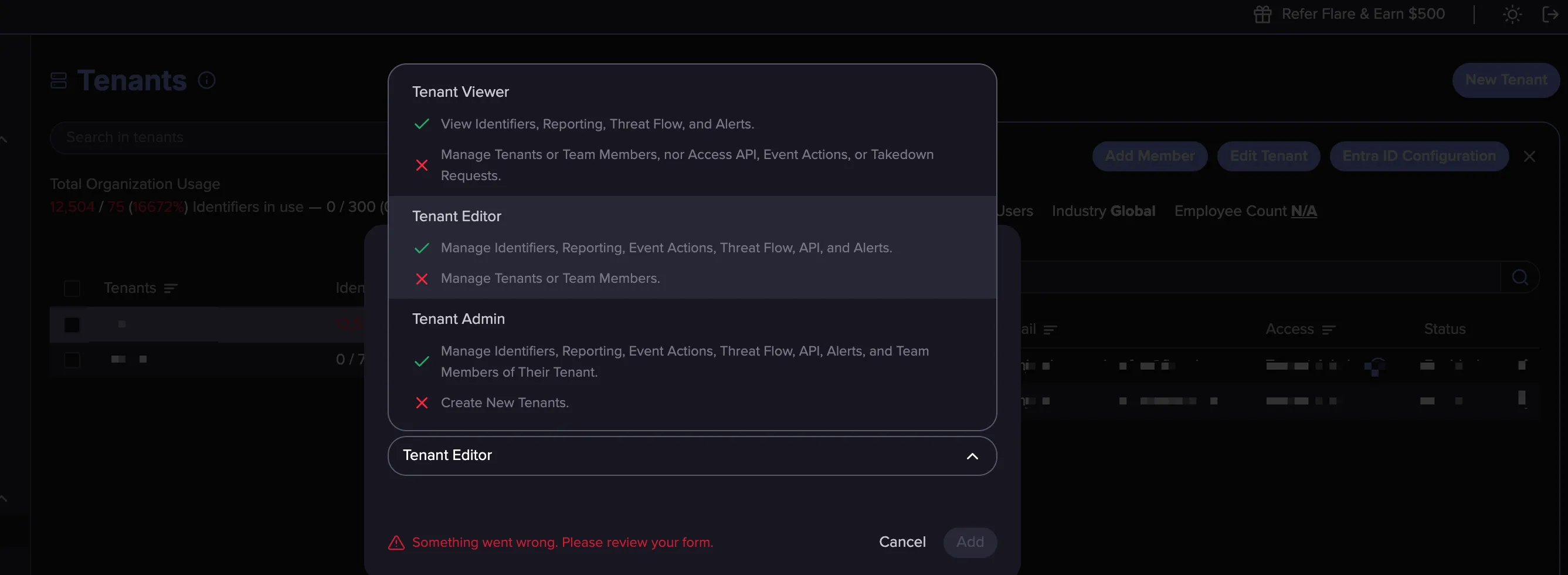
If you want more information on how to add a member and assign a specific role, you can go to the dedicated section Team
FAQ
Can a Tenant Admin assign another Tenant Admin?
- No. Only an Organization Administrator (Org Admin) can grant or revoke the Tenant Admin role. Tenant Admins cannot promote other users to Tenant Admin within their tenant—this prevents privilege escalation and maintains separation of duties.
Can a Tenant Admin create a new tenant?
- No. Only an Org Admin can create tenants within the organization. Tenant Admins can manage settings and users for the tenants they’re assigned to, but they cannot create additional tenants.
Can a Tenant Admin add a user not already added to the Org?
- Yes
What if a Tenant Admin is adding member that already exists in the Org?
- If the email is already registered in the organization, the existing account will be added to the Tenant. The First and Last Name entered will not update their existing details within the Organization.
For more details on the Tenant Admin role capabilities, check out this Storylane walkthrough.
Related Articles