Search in Existing Data
Search Bar
The Search Bar at the top of the Events page allows searching in Flare's database. A search does not send requests to third-party services such as GitHub or Google to collect new data. To benefit from the full power of Flare and actively monitor for threats on an ongoing basis, it is recommended to create identifiers, save them, and browse their results as described in IdentifiersConfiguring Identifiers.
- The Tenant Feed section will search within events collected that match your Identifiers’ parameters.
- The Global Search section (available depending on your subscription level) allows searching in all of Flare’s database

Available filters
A Search is composed of a search query in the input field, as well as multiple filters to control the scope of the search:
- Show: determines whether New, Remediated, and Ignored results are displayed or not
- Severity: determines which event severity levels are displayed
- Date: determines the date range of displayed results
- Categories: determines which source categories will be searched
- Tags: filters displayed results according to the tags that have been applied on events
- Attributes: filters displayed results whether they have notes or a modified severity score
Building Advanced Queries
For more precise results, you can leverage advanced queries to target specific fields and attributes. The search bar accepts the Lucene Query Syntax, which allows to leverage boolean operators and regexes.
As you interact with the search bar, a search query assistant will appear to suggest fields that can be used to access Flare’s data models. As you type, suggestions among fields, terms, and operators will be highlighted to match your input. You can use the keyboard or your mouse pointer to select the suggested items and apply them to your search query.

Syntax and Boolean Logic
Here are some more query examples:
Looking For | Search |
|---|---|
The word "Bank" or the word "Fraud" | Bank Fraud |
The word "Bank" and the word "Fraud" | Bank AND Fraud |
The exact expression "Bank Fraud" | "Bank Fraud" |
Any expression starting with "Bank of" | "Bank of *" |
General bank fraud activity in Canada | (Canada Can) AND (bank logs) |
The regex Ban[ck] +[1-9] | /Ban[ck] +[1-9]/ |
Searching in Specific Fields
It is possible to search for data present in specific data fields by specifying them in the search. More information is available about data fields here.
Here are some query examples for common situations. Any of these can be combined with additional filters using the AND keyword.
Looking For | Search |
|---|---|
Subdomains of example.com | features.reversed_domains:com.example.* |
The CVE 2018-15919 | features.vulnerabilities:"CVE-2018-15919" |
An IP address range | features.ip_addresses_cidr:"212.25.35.0/24" |
Source code results that contain leaked secrets | contains_secrets:true |
All commits from an email address | commit.committer_email:[email protected] |
All commits from a domain | commit.committer_email:scatterholt.com |
Hosts with a specific HTTP response | http_status:403 |
Filter Events Using Password Attributes
Leaked credential Events can be filtered by a set of password attributes that describe the leaked password, including its length and the counts of lowercase, uppercase, numeric, and special characters. These attributes are available when searching for Events in the Events feed or Global Search and in matching policies.
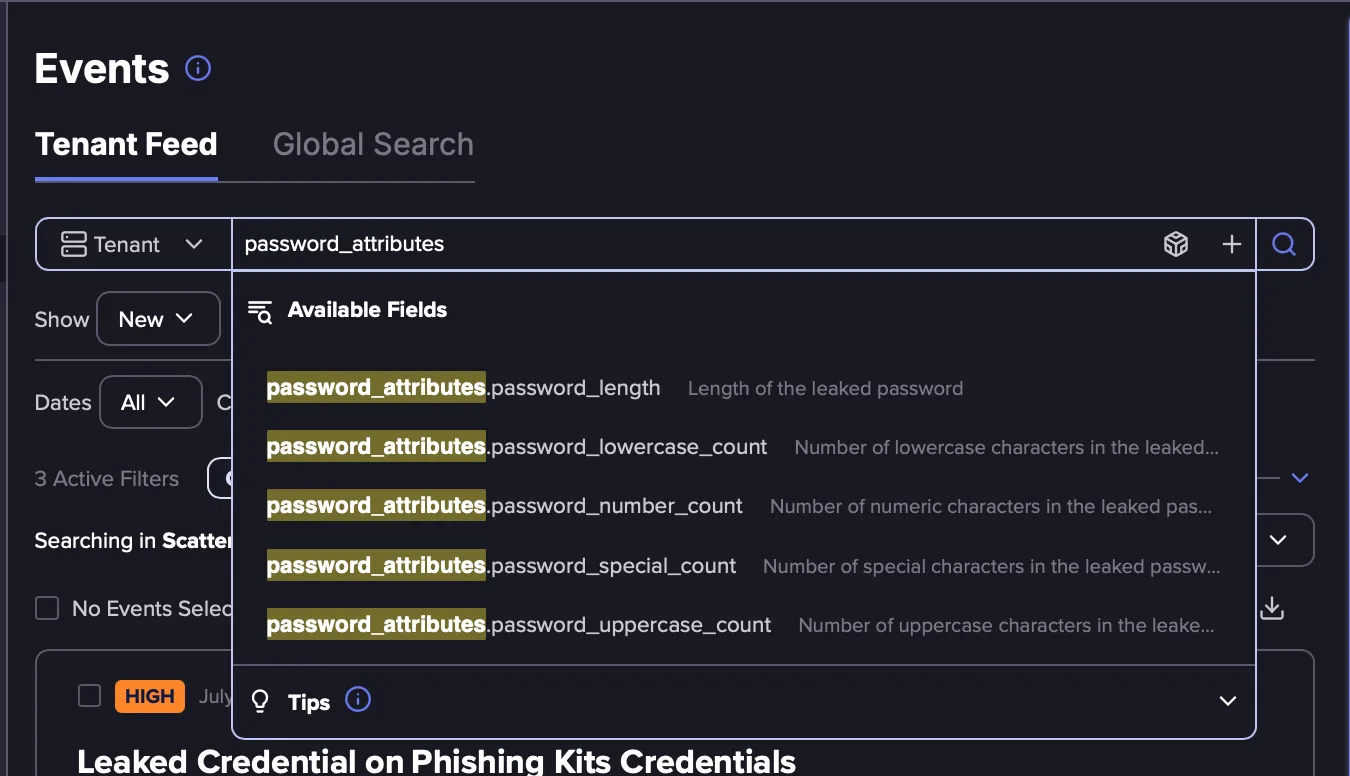
Here are the available password attributes:
Looking for | Search |
|---|---|
Passwords shorter than 10 characters | password_attributes.password_length:<10 |
Passwords with no lowercase letters | password_attributes.password_lowercase_count:0 |
Passwords with no uppercase letters | password_attributes.password_uppercase_count:0 |
Passwords with no numbers | password_attributes.password_number_count:0 |
Passwords with no special characters | password_attributes.password_special_count:0 |
Passwords meeting a full policy (10+ characters, 1+ number, 1+ special) | password_attributes.password_length:>=10
AND password_attributes.password_number_count:>=1 AND password_attributes.password_special_count:>=1 |
Use these attributes in the Events Feed or Global Search to find matching Events. You can also add them to a Matching PolicyMatching Policy applying filtering on these Events automatically going forward.
Searching with Regex
Regexes are intensive on the search engine and tend to timeout if they are used as-is without any other search terms.
We recommend searching in specific fields when using regexes as it lowers significantly the time required to run the search (e.g. features.domain:example.com AND /reg[ex]1/).
Regexes in Flare support the Elasticsearch regex syntax. More information about that syntax is available here.
Searching for special characters or words in non-latin scripts
To look for any non-latin script you need to put each word between: /<your_term>/
Example: if you search in russian for accesses that are sold by initial access brokers on the XSS forum:
- metadata.source:”xss_is” AND /Доступ*/ AND /Цена/
Data access and privacy safeguards
Some sensitive data elements are subject to privacy safeguards that support compliance with GDPR and other privacy regulations. As a result, certain data fields may appear masked or obfuscated, or may not be visible in your environment. This is expected behavior and is intended to protect the privacy and security of the individuals and organizations involved. These safeguards apply only to stealer logs, leaked credentials, and PII, which are the most sensitive data elements. All other data sources, including dark web, ransomware, and Telegram, remain fully accessible. If broader access is needed for your use case, completing domain authorizationdomain authorization typically provides largely unrestricted access to events involving your domain. Your Flare customer success manager can help review your current configuration and answer any questions.