Credentials Browser
What is the Credential Browser?
The Credentials Browser in Flare offers an intuitive interface to search, review, and manage leaked credentials. It enables security teams to quickly identify compromised credentials across various sources, helping organizations proactively protect their accounts and digital assets. With advanced filtering, search capabilities, and export options, the Credentials Browser streamlines the process of investigating credential leaks, prioritizing risks, and responding to potential security threats.
Key Features
- Efficient Search: Navigate through Flare's comprehensive database of leaked credentials.
- Precision Filtering: Refine searches based on domain, reverse domain, email, username, and password for targeted investigation.
- Easy Tagging: Quickly mark results as remediated or ignored for streamlined management.
- Remediated: A credential pair will appear as remediated if found again in a new source
- Ignored: A username/email will be ignored if found in a new source
- Validation with Identity Provider: When an Microsoft Entra IDintegration with Entra ID is set up, instantly validate credentials for efficient assessment and triage of leaked credentials.
- Access Identity ProfileIdentity ProfileIdentity Profilesss: With Identity Exposure Management OverviewIdentity Exposure Management, contextualize credentials leaks for your corporate identities, automate validation and response.
- Export Capability: Conveniently export discovered credentials for reporting or integration with other security systems.
How It Works
Start by visiting the Credentials Browser page, where you can use the search bar to find potential matches in Flare’s Leaked Credentials Database. You can filter results by Domain, Email, Password, and other criteria to narrow your search.
Tenant Feed
The Tenant Feed view is designed to provide you with a centralized view of all the leaked credentials that relate to your identifiers.
Metrics
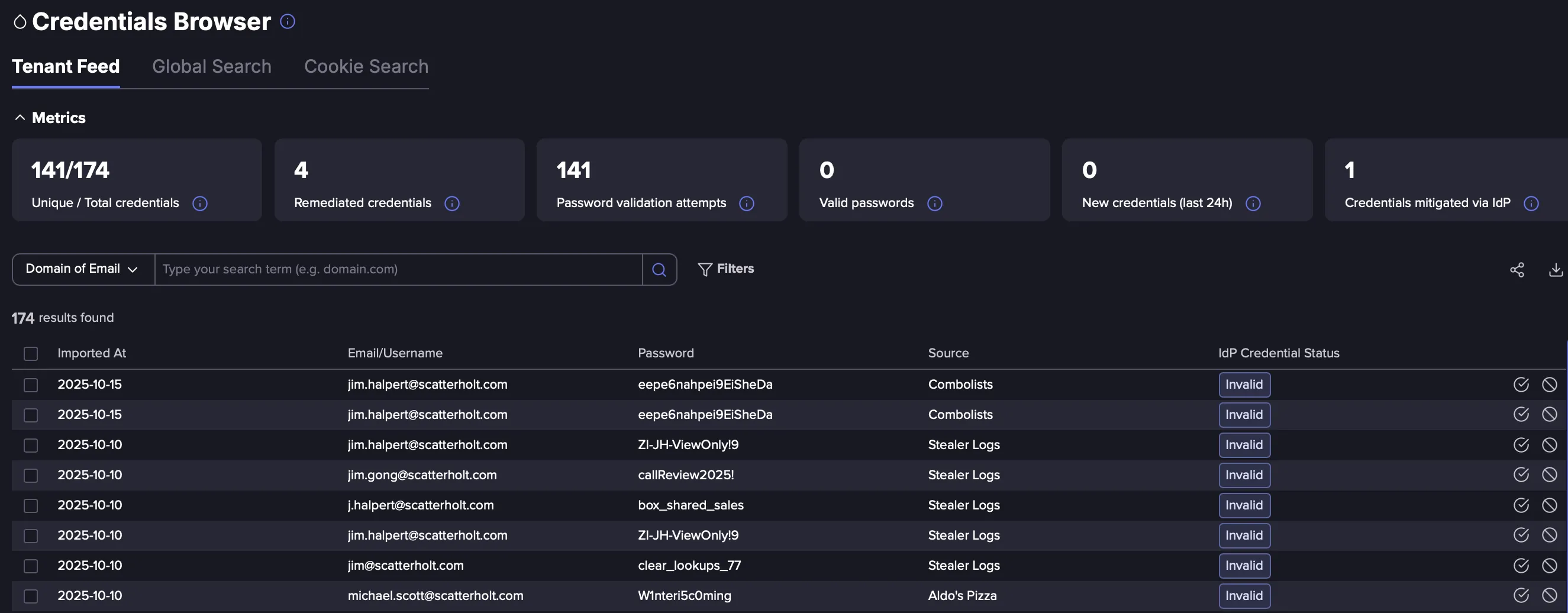
On top of the Tenant Feed, you can find metrics representing credentials related to your identifiers. Metrics related to Validation and Mitigation with your Identity Provider are only available when such an integration has been set up.
- Unique / Total credentials: Unique and Total counts of credential pairs found across all captured events.
- Remediated credentials: Total number of credential pairs with a remediated status.
- Password validation attempts: Total number of passwords for which validation with an Identity Provider was attempted.
- Valid passwords: Total number of passwords tested as valid with an IdP
- New credentials (last 24h): Total number of new credentials pairs imported in the last 24h.
- Credentials mitigated via IdP: Total number of credentials pairs for which an automated action has been triggered via an Identity Provider.
Global Search
The Global Search view enables you to search for publicly leaked credentials within Flare's extensive Leaks Database. Unlike the Tenant Feed view, which is scoped specifically to your tenant, the Global Search View provides a broader perspective, allowing you to search across all available credentials in Flare’s database.
Flare's database contains close to 20 billion leaked credentials, giving you unparalleled access to one of the largest collections of compromised data in the industry. This comprehensive coverage helps you identify potential threats and breaches beyond your organization’s direct footprint, empowering you to take proactive security measures.
For more information and access to Global Search, contact your CSM.
Key Differences Between Tenant Feed and Global Search views
Feature | Tenant Feed View | Global Search View |
|---|---|---|
Scope | Limited to your tenant | All available data sources across all the Flare leaks database |
Depth | Limited to 10k credentials per single leak | All credentials across all the Flare leaks |
Use Case | Tenant-specific monitoring | Broad, cross-tenant investigations |
Filtering | Date imported, Identifier scope, Password policy, source type, IdP Credential Status, Flare Status, Hide Combolist, Hide Duplicates | Date imported, Source, Hide Combolists |
Remediate & Ignore | Remediate and Ignore actions are available in the tenant feed | Not available in Global Search |
The Tenant Feed View is also limited in depth. If more than 10k credentials from within a single leak match your identifiers we will only show the first 10k credentials in the Credentials Browser. To see the entire list of credentials that match your identifiers in that leak, you can go to the tenant event feed and search for one of the credentials showing the limit notice icon to find the event card with the entire list of corresponding credentials.
Filters
Date Imported
This filters on the Imported At date. This represents when Flare imported the leaked credential into our database.
Identifier Scope
As in the tenant feed search within the Events section of the app, in the Tenant Feed tab of the Credentials Browser you can select to display only a specific identifier feed, an identifier group feed, or all your identifiers.
Password Policy
With this filter, you can select which password policies you want to include or exclude. This enables you to display only leaked credentials that match your organisation's password policy.
Source
This filters on the source of the data. So where that leaked credential was found on the illicit web.
Ignore Combolists
This toggles whether credentials originating from Combolist are displayed or not.
IdP Credential Status
Available with an active Idp Integration: This filters on the status of the credentials after validating it with the IdP.
Flare Status
This allows you to select between viewing New, Remediated, Ignored, or All credentials.
Hide Duplicates
In case of repeated credential pairs, this toggle keeps only the first imported occurence of each unique combination of Email/Username and Password.

Search Types
When using the Credentials Browser, you can run searches across various categories to efficiently narrow down your results and identify potential risks. Each category serves a unique purpose, allowing you to focus on specific identifiers or attributes to pinpoint leaked credentials. Below is an overview of the available search types and their functionalities:
Domain of Email
Search by entering a domain to find credentials associated with that domain in Flare's Leaks Database.
If a full email address is entered instead of a domain, Flare will automatically extract and use the domain portion (e.g., entering [email protected] will search for myorg.com), ensuring the search runs without an error.
Reverse Domain
In Global Search only – Allows you to search for subdomains using an autocomplete feature by reversing the order of the domain (e.g., entering com.google will display a dropdown of related subdomains like accounts.google.com).
Search in Flare's Leaks Database for an exact email address (e.g., [email protected]) to find any leaked credentials linked to that specific email.
Note: when searching using the email type, you can also search for a specific password (this would be an exact match search).
Username
Search for an exact username to locate credentials tied to that username in Flare's Leaks Database.
Note: when searching using the username, you can also search for a specific password (this would be an exact match search).
Password
Search in Flare's Leaks Database for a specific password you know to see if it appears in any leaks.
URL
Search in Flare's Leaks Database by entering a specific URL (e.g., login.example.com) to identify credentials that have been compromised for a particular service or endpoint.
Export Credentials
An Export function allows you to download a CSV file of the currently displayed credentials.
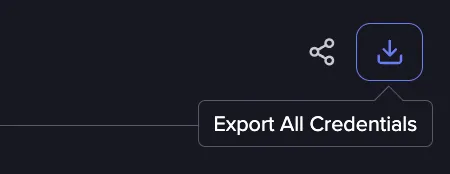
Please note that it is only possible to export 10 thousands credentials at a time.
If you have more Credentials to export, you could for example use the date range filter to isolate sets of less than 10K items to export.