Duplication Policies for Tenants
Duplication Policies help prevent repeated Events for identical market listings, forum posts, chat messages, paste files, and stealer logs. When two or more identical items are detected, repeated Events are not created for each one based on the active policy.
These policies let you customize your preferences based on parameters such as content, source, and actor. By preventing Events for identical data, they reduce noise and redundancy so you can stay focused on new and relevant threats or incidents. This keeps Event volume manageable and helps you avoid alert fatigue.
To enable or disable a policy, select it from the Tenant Duplication Policies list, then use the Enable toggle in the Toggle Global Policy panel. The panel also displays a summary of what the selected policy does.
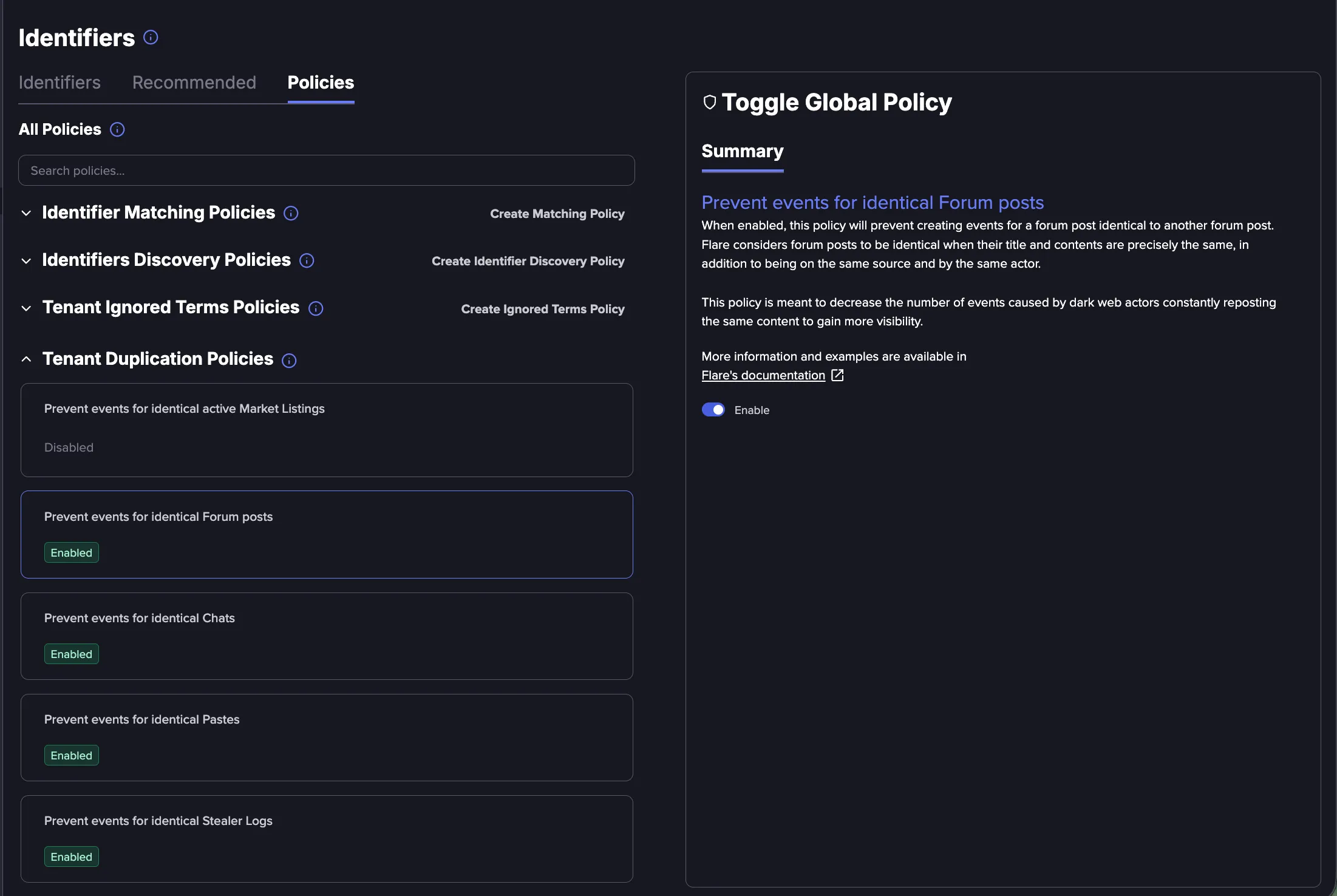
Types of Tenant Duplication Policies
Following policies are available in Flare. These policies are enabled by default, but they can be turned off, if needed.
Prevent Events for Identical Active Market Listing
When enabled, this policy prevents creating Events for a market listing identical to another active listing. Listings are considered identical when their title and contents are precisely the same, and when they are on the same source and by the same actor. A listing is considered active if it was available to view in the last 48 hours, based on the Last seen at date. This policy reduces the number of Events caused by dark web actors repeatedly reposting the same content to gain more visibility.
Prevent Events for Identical Forum Posts
When enabled, this policy prevents creating Events for a forum post identical to another forum post. Forum posts are considered identical when their title and contents are precisely the same, and when they are on the same source and by the same actor. This policy reduces the number of Events caused by dark web actors repeatedly reposting the same content to gain more visibility.
Prevent Events for Identical Chats
When enabled, this policy prevents creating Events for a chat message identical to another chat message. Chat messages are considered identical when their contents are precisely the same, and when they are on the same source and by the same actor. This policy reduces the number of Events caused by dark web actors repeatedly reposting the same content to gain more visibility.
Prevent Events for Identical Pastes
When enabled, this policy prevents creating Events for a paste file identical to another paste file. Paste files are considered identical when their contents are precisely the same, and when they are on the same source and by the same actor. This policy reduces the number of Events caused by files being shared repeatedly on a single paste site.
Prevent events for Identical Stealer Logs
When enabled, this policy prevents creating Events for a stealer log identical to another stealer log. Stealer logs are considered identical when they originate from the same infected device.
Prevent Events for Identical Attachments
When enabled, this policy prevents creating events for an attachment identical to another attachment within the same conversation. Attachments are considered identical when their file hash is precisely the same, and when they are on the same source and within the same conversation. If the same attachment is shared across different conversations, a separate event is created for each. This policy reduces the number of events caused by the same attachment being shared multiple times within a single conversation.
Prevent Multiple Events for Ransomware File Listings (per day)
When enabled, this policy limits event creation to one file listing event that matches your Identifiers per 24 hours, per ransomware leak. A ransomware file listing shows the names and folder structure of files that a ransomware group has stolen and published on its data leak site. Since Ransomware file listings can be very large, they are collected in multiple parts, often over multiple days.
- When this policy is disabled, an event is created for each file listing that contains a match, which can produce hundreds of events for a single ransomware leak.
- With the policy enabled, the first match on a file listing creates one event, and no further events are created for that ransomware leak for the next 24 hours. All files from the ransomware leak are available from the same event, including files collected as part of other file listings, so you can review and search the full ransomware leak from a single event.
When to disable this policy
This policy is applied per ransomware leak, not per Identifier. After any of your Identifiers matches a file listing, no new events or alerts are created for that ransomware leak for 24 hours, even if a different Identifier matches a file collected later. The files remain visible and searchable in the original event, but you are not notified of the additional match.
For example, if one of your Identifiers matches the first file listing of a ransomware leak, an event is created for that match. If a second Identifier matches a file collected an hour later, no new event is created.
If your triage process depends on knowing every Identifier that matches a ransomware file listing, it is recommended to disable this policy. Keep in mind that when this policy is disabled, an event is created for each file listing of a ransomware leak that contains a match and a higher volume of events is expected, including multiple events for the same Identifier.