Ignored Terms Policies for Tenants
Tenant Ignored Terms Policies let you reduce irrelevant Events across your entire Tenant by adding terms you want to filter out. Once a term is added, similar Events containing that term are prevented from appearing in your feed going forward.
These policies differ from Identifier Matching Policies, which apply only to a specific Identifier. Ignored Terms policies apply across your whole Tenant.
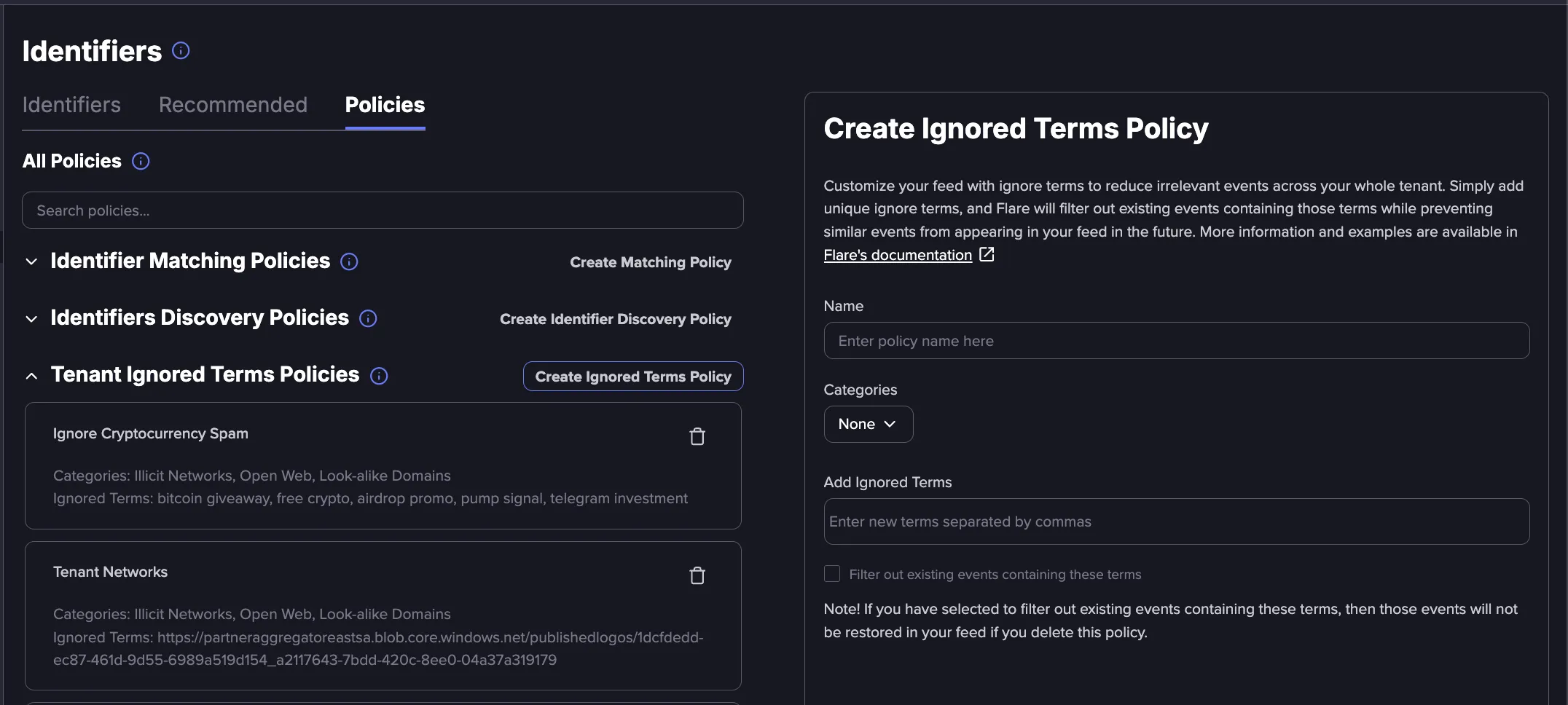
Adding Ignored Terms
Follow these steps to add a Tenant Ignored Term Policy:
Navigate to the Identifiers page and select the Policies tab.
Under All Policies, locate Tenant Ignored Terms Policies and select Create Ignored Terms Policy.
Enter a name for the policy and select one or more categories.
In the Add Ignored Terms field, enter the terms you want to filter out, separated by commas. Each policy can contain up to 50 terms.
To remove historical Events that contain these terms, select Filter out existing events containing these terms. Leave this unchecked to apply the policy only to new Events going forward.
Save the policy.
- After you create the policy, it can take a few hours for the impact to appear in the Events in your Tenant.
- If you select Filter out existing events containing these terms, those Events will not be restored to your feed if you later delete the policy.
Deleting a policy
If you delete an Ignored Terms policy, new Events containing the previously ignored terms will start entering your Tenant again. Past Events that were filtered out will not be repopulated.